
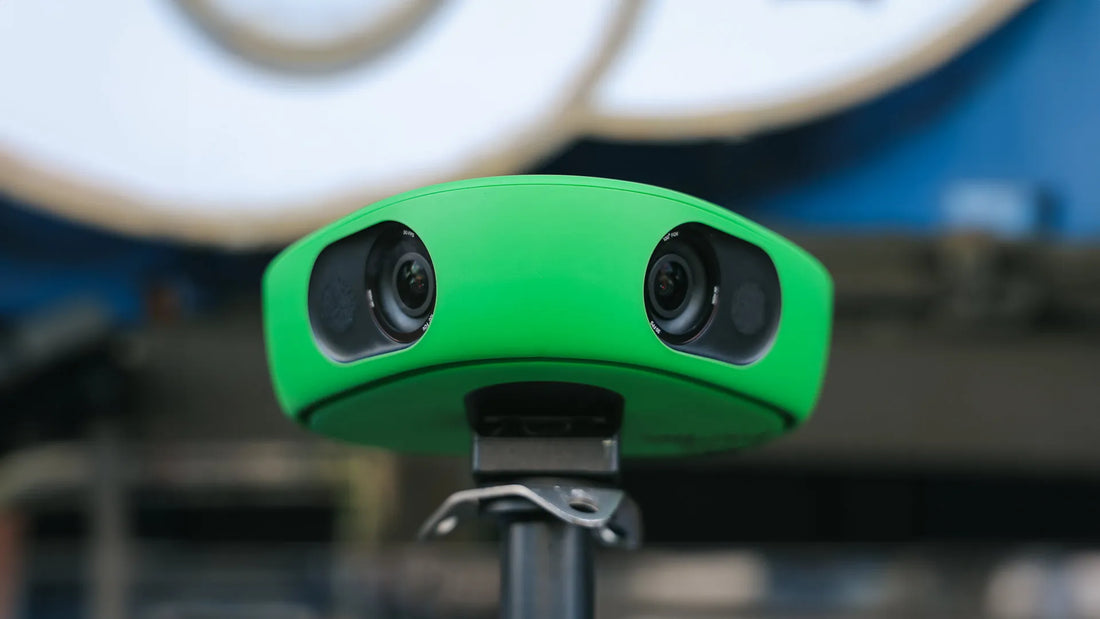
Veo has become one of the default recommendations for clubs that want match footage without assigning a parent or assistant coach to stand behind a tripod for 90 minutes. That convenience is real, but so is the catch: the camera is only part of the bill. For clubs, the buying decision comes down to three things: how often you film, how much the subscription adds over a season, and whether the workflow saves staff time.
This review focuses on those practical questions rather than repeating the brochure. I’ll cover what the system does well, where it becomes frustrating, what you can expect to pay in the UK, and which type of buyer should choose current hardware, older hardware, or skip Veo altogether.
🎥 What Is the Veo Camera System?
Veo is a smart camera system that automatically records and analyses football matches without the need for a cameraman. Using dual 4K lenses and artificial intelligence, it follows the ball, creates highlights, and gives coaches, players, and parents access to powerful tools for review, development, and sharing.
It’s designed for:
- Grassroots and youth football teams
- Amateur and semi-pro clubs
- Schools and academies
- Parents of aspiring players
What matters in a real review is not just the spec sheet. We judge Veo on five things that affect weekly use: how long setup takes on a touchline, how reliable the auto-tracking is during a full match, how painful the upload and processing stage feels afterward, whether the analysis tools help coaching, and what the total cost looks like over a full season once software is included.
My biggest positive with systems like this is simple: once it is mounted correctly, one more adult is freed up to coach, manage subs, or just watch the game properly. The main inconvenience comes later. The least glamorous part of Veo is not recording; it is waiting for uploads and processing when your connection is average and you want clips quickly after the final whistle.
How We Evaluated the Veo Camera System
Buyers who hesitate over Veo’s price include youth coaches, school staff, small clubs, and parents weighing whether it is a useful tool or an expensive luxury. The criteria emphasize practical concerns rather than cinematic ones.
First, setup: how fast a coach can get the camera mounted, started, and trusted before kickoff. Second, footage quality and reliability: whether the wide-angle capture and automated tracking are good enough for coaching points, player clips, and post-match review. Third, workflow: how easy it is to upload, process, and share a game without needing a media person. Fourth, analysis value: whether playlists, tagging, tracking, and review tools save time or just add another admin task. Fifth, cost over a season: hardware, software, and any region-specific extras that affect ownership cost.
I also weigh Veo differently depending on use case. A grassroots club filming every week can justify a higher ongoing bill if it removes manual filming and creates a useful archive. A parent filming a few showcase matches usually cannot. That difference matters more than any headline feature.
🤹 Veo Camera Versions Explained
There are two main versions of the Veo camera available as of 2025:
📹 Veo Cam 1
- The original model
- Dual 4K lenses
- Records 180° panoramic footage
- Requires Wi-Fi to upload to cloud
- No built-in live-streaming
- Now phased out but still in use
🌟 Veo Cam 2
- Current flagship model
- Dual 4K lenses with higher frame rate
- Built-in LTE for on-the-go uploading
- Live-streaming option (subscription-based)
- USB-C charging
- Improved low-light performance
- Faster AI processing
Comparison Table:
| Feature | Veo Cam 1 | Veo Cam 2 |
|---|---|---|
| Resolution | Dual 4K lenses | Dual 4K lenses (higher FPS) |
| Field of View | 180° | 180° |
| Live Streaming | ❌ Not available | ✅ Available (with subscription) |
| Upload Method | Wi-Fi/Ethernet | Wi-Fi, Ethernet, LTE (SIM enabled) |
| Battery & Storage | Internal | Internal (USB-C) |
| AI & Processing Speed | Good | Faster and more accurate |
✨ What Are the Benefits of a Veo Camera?
1. No camera operator needed. Set it up behind the goal or at halfway, press record, and let the AI handle everything.
2. Tactical analysis, Coaches can break down play, pause footage, and draw directly on-screen.
3. Player development. Footage allows players to see mistakes, review movement, and build highlights.
4. Great for scouting, Exportable clips and playlists make it easy to share with recruiters.
5. Easy sharing. Parents love the replay features and highlight tools.
6. Live streaming (Veo Cam 2 only) Stream matches straight to YouTube or Veo Live for fans or remote coaches.
"It's like giving every grassroots coach a Premier League-level analysis suite."
💰 Veo Pricing & Subscription Options
Many reviews stay too vague. Veo is not a simple one-off camera purchase; it is a hardware-plus-software system, and the annual software fee changes the value equation more than the camera itself.
The safest way to answer how much does a Veo camera cost is to separate confirmed current pricing from model speculation. For UK buyers, that means grounding your decision in available Veo Cam 2 and subscription information rather than treating Veo Cam 3 rumours as settled fact. Veo publishes current buying details through its official camera pages and subscription pages, and those should be your starting point before any purchase.
For UK subscription tiers, market summaries have commonly placed annual pricing around £395 for Team, £595 for Team+, and £895 for Elite, with user limits and monthly recording allowances increasing by plan level, as outlined in this subscription comparison and reflected in our own earlier Veo camera review. That gives you a more useful planning range for veo subscription cost uk than focusing on a single headline number.
| Plan | Approx. Annual Cost | Key Features Included |
|---|---|---|
| Team | £395/year | Video upload, shareable links, basic analysis tools |
| Team+ | £595/year | Advanced analytics, playlists, player tracking |
| Elite | £895/year | Priority support, full AI suite, multi-team management |
Hardware cost vs ongoing software cost
A simple way to think about it:
- Year 1: camera purchase + subscription + likely VAT/shipping
- Year 2 onward: subscription, plus any accessories or replacement parts
For a Veo Cam 2 buyer, the exact first-year total depends on the hardware offer available at the time you buy and the plan you choose. The software bill is easier to model than the camera price: even on lower tiers, the annual subscription is a meaningful part of the ownership cost. That is why the true veo camera cost is not just the hardware card on day one.
Which plan suits which buyer?
- Lower-tier plan: best for one team that mainly wants recordings, straightforward sharing, and occasional review.
- Mid-tier plan: better for clubs that want playlists, stronger player tracking, and more organised post-match analysis.
- Top-tier plan: makes sense for larger programmes, schools, or clubs managing multiple squads, heavier usage, and more staff accounts.
The practical question is not whether the top plan has more features; it is whether anyone at your club will consistently use them. I have seen plenty of teams overpay for analysis tools they barely touch after the first few weeks.
UK pricing context
UK buyers should budget for more than the list price shown on a headline product card. Depending on where you buy, VAT may be added at checkout, and shipping or region-specific reseller pricing can move the final number. That matters because the difference between an attractive hardware price and the full first-year bill can be substantial once software is included.
If you are comparing Veo Cam 2 with possible newer releases, the sensible approach is simple: price the currently available system first, then treat any future model premium as a possibility rather than a fact until Veo confirms it officially. That keeps this veo camera review consistent with real buying decisions instead of rumor-driven ones.
Can Veo Be Used Without a Subscription?
Yes, but only in a limited sense.
Owning the camera does not automatically give you the full Veo experience. Without an active subscription, the hardware can still record footage, but the platform features that make Veo attractive — cloud processing, AI tracking, editing, organised sharing, analytics, and many review tools — are restricted or unavailable depending on the plan status and model. Veo’s own subscription overview makes clear that the software layer is part of the product, not an optional extra for power users.
In practical terms, this means a team can keep the camera and still capture video, but it loses most of the convenience and coaching value people are paying for in the first place. If your plan is to buy the hardware now and skip subscription costs indefinitely, Veo is usually the wrong purchase. The better question is whether your team wants a recording device or a managed filming-and-analysis workflow. Veo is built for the second one.
My honest take: for clubs that only want a raw archive of occasional matches, a simpler camera setup can be better value. Veo earns its keep when you use the software every week.
🧐 Are Veo Cameras Worth It?
This is the big question. Based on our experience, the answer is yes — if you plan to use it regularly.
Veo is worth it if:
- You're coaching a team and want to improve tactics
- You want to help your players develop or get scouted
- You have parents who value game footage and replays
Veo might not be worth it if:
- You only want to film once or twice a season
- You don’t want to pay for an annual subscription
- You prefer fully manual control of footage/editing
Real story: We recorded a U14 cup final and used Veo to create a post-match highlights reel. Not only did the players love watching themselves back, but we spotted positional issues we missed live.
❌ What Are the Disadvantages of Veo?
Let’s be honest — it's not perfect.
- Subscription required: For most features, you’ll need a paid plan.
- Internet upload time: Matches can take hours to upload, depending on your connection.
- No real-time zoom or commentary: You get panoramic footage; editing happens after.
- Not ideal for indoor or poorly lit pitches (though Cam 2 improves this)
If you are also comparing newer AI filming products and naming conventions that can get confusing, Aicut's guide is a useful side read before you commit.
🌐 Alternatives to Veo
- Trace – Better for individual player clips, uses GPS trackers
- Pixellot Air – More compact, also AI-powered, ideal for schools
- Soccer SmartCam – Budget option with manual control
Still, for fully automated team-level filming, Veo remains the gold standard.
For a more in-depth look at the alternatives, check out our post on the best soccer training cameras for 2025.
What About Veo Cam 3?
The safest way to cover Veo Cam 3 is to stick to what is confirmed. Veo has published current camera information through its official camera lineup, and buyers should rely on that rather than forum rumours or speculative feature lists.
If you are searching for a veo cam 3 review, the key point is caution: evaluate only confirmed pricing, subscription compatibility, and workflow improvements that Veo has officially listed for your region. If Veo has not officially listed a release in your market, treat any “review” based on leaked features as guesswork. At the time of writing, the smart move is not to chase rumours but to compare the available buying paths in front of you.
Here is the practical choice:
- Buy current hardware now if your team films often and the time saved this season matters more than waiting.
- Consider used Veo Cam 1 if budget is tight and you mainly need basic automated recording, accepting that it is older hardware with fewer modern conveniences.
- Hold off for Cam 3 only if your budget is already set aside and you are specifically waiting for an officially confirmed model in your region rather than needing a system immediately.
My recommendation is straightforward: don’t delay a whole season of useful footage because of a maybe. For most grassroots buyers, a proven current model is a better decision than waiting on a release timeline that may not match your club calendar.
📄 Final Verdict: Should You Buy a Veo Camera?
Value per use matters more than headline features. Veo is a strong buy for clubs, schools, and coaches who film regularly enough to spread the hardware and subscription costs across a full season. In that setting, it saves staff time, creates a reliable video archive, and gives you analysis tools that are helpful when someone on the coaching side uses them.
You should buy now if you record matches weekly, want to stop relying on a volunteer camera operator, and can tolerate an ongoing subscription as part of your analysis budget. You should skip it if you only need occasional footage, dislike recurring software costs, or know your team will not review video consistently after the novelty wears off. If budget is the main concern, older hardware can make more sense than stretching for the newest setup.
For grassroots clubs, Veo makes the most sense when several coaches, parents, or squads benefit from the same footage pipeline. For schools and academies, the platform is easier to justify because recording, review, and sharing are used across more sessions and teams. For parents filming occasional matches, the economics are much tougher; unless player development video is a regular priority, a lower-cost filming option is usually the smarter call.
The short version: Veo is not cheap, and it is not for everyone. But for teams that will use it week after week, it can be one of the few football-tech purchases that saves time while improving review quality.
❓ FAQs
Are Veo cameras worth it?
Yes, especially for coaches and teams serious about development and analysis.
What are the disadvantages of Veo?
Subscriptions, long upload times, and limited control during filming.
Does a Veo camera work without a subscription?
Yes, but without cloud features like editing, sharing, or AI tools.
How much does Veo cost per year?
Plans range from £395 to £895 per year, depending on the features.
Does Veo charge a fee?
Yes. You buy the camera once, then pay an annual subscription to access its full features.
What are the benefits of a Veo camera?
Auto-recording, AI tracking, analysis tools, live streaming, and highlight creation.
What’s the difference between Veo Cam 1 and Cam 2?
Cam 2 adds live streaming, faster AI, better low-light recording, and LTE upload.
Let us know if you want help setting up a Veo system or if you'd like us to review one for your team!